Early 2026 I had quite a few project managers that I worked with asking in Slack about whether projects were safe to publish to production.
Asking what changes there were always ended up in a long back and forth that had to cross time zones and generally speaking was just a bit of a pain. It felt like a huge inefficiency in the Webflow development process.
At the time I was already building an app that allowed users and organisations to track Webflow publishes. The app hooked into the site's webhooks on every publish, crawled the site, logged the diff against the previous version, and kept a running history so bugs could be traced back to a specific deploy. It also connected to the Slack API to post a per-publish summary so the team could spot check only the pages that had actually changed.
The comparison tool started as a supporting feature inside that toolkit. After building it, I realised it was a strong standalone. So I abstracted it out as its own free tool and put the publish tracker on hold.
So this is an explainer walkthrough of the decisions that I went through when building it.
I started with what I knew
My first goal when building something like this is to just see if it's useful at all. Test it myself and see if it solves my own need.
To do that I reached for the tech I had experience with. It wasn't about architectural decisions at this point, but about speed and familiarity.
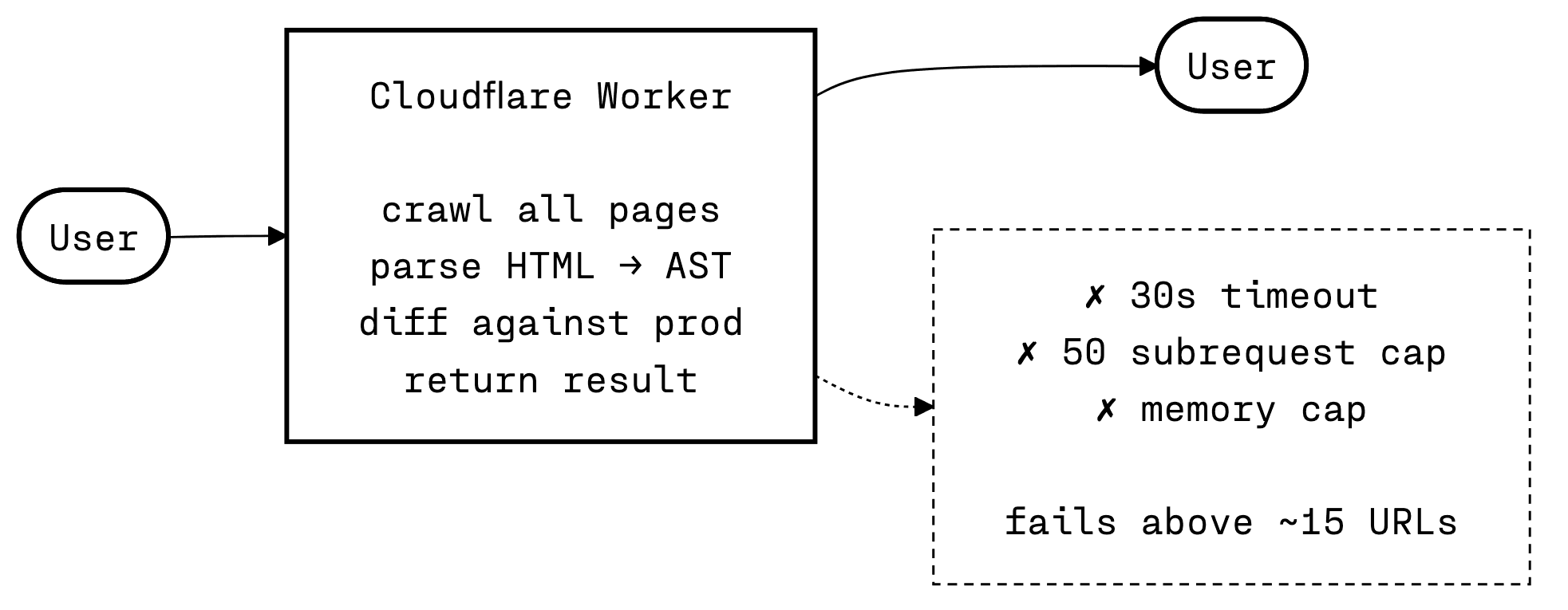
As such, I built it on a single Cloudflare worker where the requests would be sent, the worker would crawl all the pages, edit everything, create a tree of the HTML (known as an AST) and return the response back to the user. I knew that this wouldn't be scalable, but my goal was to just test the concept out and see if it solved the problem efficiently.
But in my initial testing that didn't work.
For any site over 10-15 URLs I hit limits on the number of requests a Cloudflare worker could make, such as a 30-second timeout, memory limits and HTTP request limits.
However, the small tests I did on very small sites felt really promising. I was successfully picking up changes I made, and I was able to identify pages that had differences, point to what those differences were, and highlight their potential consequences.
Hitting a wall, and a memory leak
I was reluctant to build in more infrastructure like a queue at this point because I just wanted to test that the idea would be useful with more URLs. So far my testing had revolved around 1-5 URL tests.
I needed to be able to test the average site of around 50 pages. So I migrated the code base from Cloudflare Workers to Railway, which is a pretty light lift because both are compatible with Hono.js. I handled the migration in an afternoon and was able to test medium sized sites.
Railway definitely fixed the rate limit and HTTP request limit, but I went from a memory limit to a memory leak. I was storing a lot of HTML and AST objects at this point, often getting close to filling the instance memory.
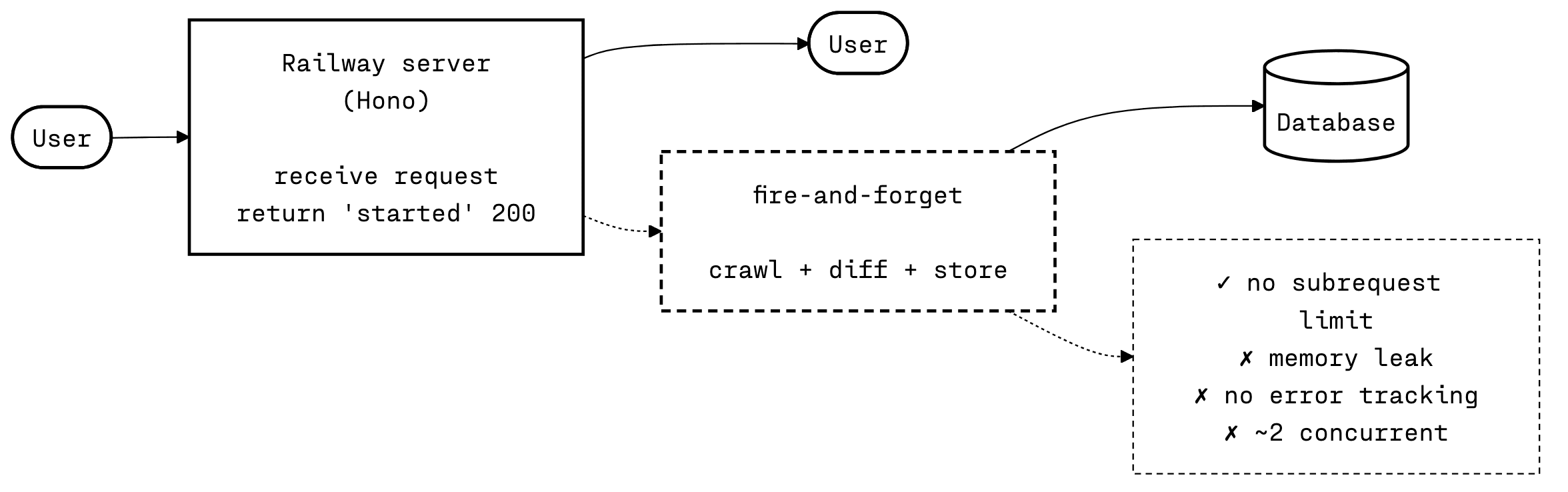
The next hurdle was having to respond to the user within a decent time frame, otherwise the HTTP connection would stall or time out. So I needed to return a response saying the crawl had been kicked off, then continue that process after the fact. I did it in a pretty ugly way. I'd receive the request, return the response and then kick off the entire process in the background.
This caused multiple issues: no error tracking, very slow and inefficient performance, and only ~2 concurrent requests. But it did give me the opportunity to see the value in the idea.
By this point I had validated the concept worked well on mid-sized sites and felt confident that there was some real value for teams using Webflow. But I was far from something I could get in the hands of testers.
Adding a queue, but keeping the work in one chunk
It was time to start optimising for real usage.
One of the goals of this project was also for me to push myself and learn, so I decided to explore a couple of tools that I didn't have as much experience with. Enter: Redis and BullMQ.
BullMQ uses Redis to create a queue system, which was exactly what I needed to solve the error tracking and concurrency limitations.
The first queue structure I went for:
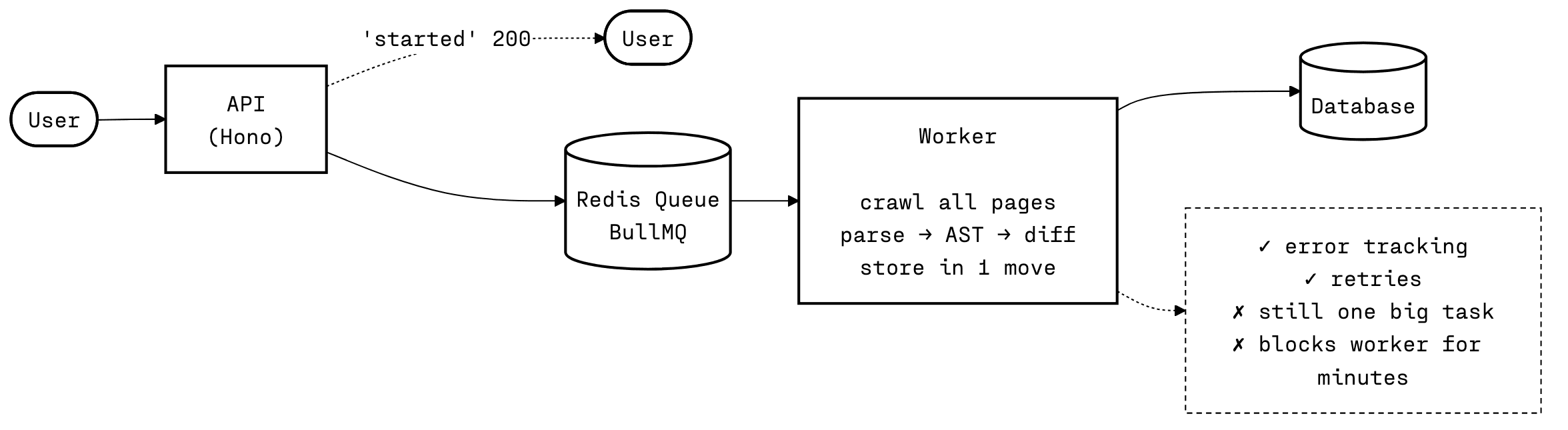
1. API receives request, responds & kicks off task to queue
2. Worker picks up task, and does the entire crawl, parse, diff and store in 1 move
Generally speaking, it wasn't too far removed from the previous version, but now at least I could see when tasks failed, keep the API clean and abstract the code more. But I still kept the entire crawling and diffing process in a single worker so still had very long blocking requests and tasks.
I was being mindful to take small steps and keep the project in working order. Continuous delivery is something I aim to practise in all projects, whether personal or for clients. With the foundations set for the queue, I was well positioned to optimise further.
Breaking the work apart
My next optimisation was to break the tasks into much smaller chunks of work. I wanted to progressively update the UI for the user as they waited for the crawl to run, making the application feel snappier.
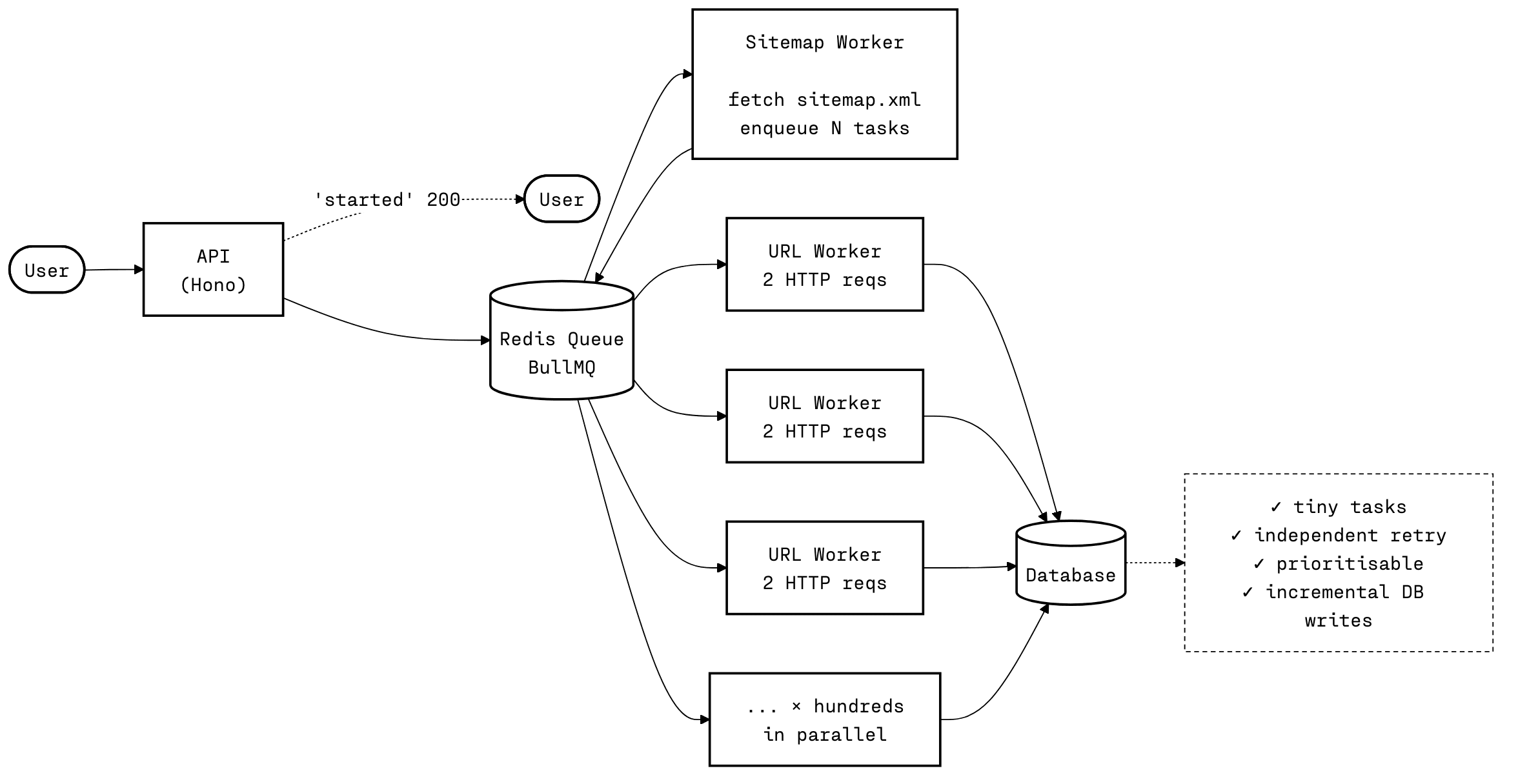
I did that by having the initial request crawl the sitemap.xml, get all the required URLs, and enqueue a new task for each one. This reduced the number of HTTP requests each worker did from hundreds to 2 while letting me update the database incrementally as each task finished.
One crawl became hundreds of independent tasks, each retryable, prioritisable, with its own failure domain. Watching the queue light up felt incredible. There was real safety in so many small tasks.
It was also significantly easier to clear memory and garbage collect AST trees and HTML, reducing memory spikes and completely removing the previous concurrency issues.
Prioritisation and small wins
Priorities were particularly useful in case a user tried to crawl an enormous site. I could prioritise the smaller crawls so that if you only had a URL with 10 pages then it would get prioritised over someone who crawled something that had hundreds of URLs. I didn't want to make the experience feel slow for users with smaller tasks, whereas users with larger ones would have to wait regardless.
I also added some minor optimisations so that I only did 1 batch of CSS fetches, one for the first prod URL and the first staging URL, because in a Webflow project the entire site uses the same CSS files.
## If I rebuilt it again
I think if I were to rebuild this for a fourth time, I would probably go back to Cloudflare Workers. The downside to Railway is having to deploy replicas in different regions to get acceptable latency. While developing this I was travelling in Japan with my replicas still set to Europe, where the vast majority of my own and my users' requests come from, and I was seeing ~500ms latency. Noticeable, and for a production tool absolutely unacceptable. I could have spun up another replica in US East, but that felt like unnecessary infrastructure for such a small tool. A Cloudflare Worker and a Cloudflare Queue would have given me much lower latency by default, kept the developer experience simple, and left other Cloudflare tools within reach if I needed them.
I'd also utilise a crawling API like ScrapingBee so I wouldn't need to worry about proxying, rate limits, etc. This would give me the opportunity to increase concurrency even more and drastically improve the performance of the application.
I've already got it on my to-do list to integrate ScrapingBee's screenshot API to highlight before/after images of edited sections, making the platform even more usable for non-technical users like the project managers the idea came from. And since I'd already be using ScrapingBee for crawling, adding the screenshot API would be trivial.
What I'd do again
I started with an inefficient version and then slowly iterated on the efficiency, which is a process I think works well for the 0-1 stages of software development in particular. The initial version might have been terribly inefficient but I was able to test the concept out cheaply and quickly in a few days, then spent my time optimising in small chunks, testing as I went along the way.
In the end the project managers got their answer in minutes, with enough context to review the pages themselves and give the client a thumbs up. Time saved for both sides.